Readiness checks for Active Directory and Microsoft 365

Know what breaks before Microsoft's next deadline does.

Attestry checks on-premises Active Directory and Microsoft 365 against every retirement date that matters, then hands you a dated plan with step-by-step fixes. Read-only. It runs on your own machine, and the data stays in your network.

  • Read-only, changes nothing
  • Nothing uploaded
  • Commercial, GCC and GCC High
Next Microsoft deadlinesAs of Nov 2, 2026
  1. NOV 072026 Self-service password reset accepts only registered methodsIdentity and sign-in
    5
    days
  2. NOV 102026 Windows 11 23H2 Enterprise and Education reach end of servicingWindows
    8
    days
  3. DEC 312026 SMTP AUTH with basic authentication turned off by default in Exchange OnlineMicrosoft 365
    59
    days
  4. JAN 122027 Windows Server 2016 and Windows 10 Enterprise LTSC 2021 reach end of supportServers
    71
    days
  5. FEB 012027 SMS and voice-call MFA retired for users (no opt-out)Identity and sign-in
    91
    days
  6. MAR 152027 Public TLS certificates limited to 100 daysCertificates and Secure Boot
    133
    days
Dates from Microsoft lifecycle and Microsoft 365 announcements, checked November 2, 2026.All deadlines and what to do
Already passed in 2026
  • June 2026Secure Boot 2011 certificates begin to expire
  • Jul 14, 2026SQL Server 2016, SharePoint 2019
  • Oct 13, 2026Server 2012 R2 ESU, Windows 10 ESU year 1, Windows 11 24H2 Home/Pro
  • October 2026Exchange 2016/2019 updates
What it checks

Three checks. One plan.

Each check is a small PowerShell tool you run on a computer in the client's network. Each one ends in a report a technician can act on and a client can read.

AD Exit Planner

Everything that still depends on Active Directory

  • Old sign-in methods Microsoft is switching off: RC4, NTLM, unsigned LDAP
  • Domain controllers and servers past or near end of support
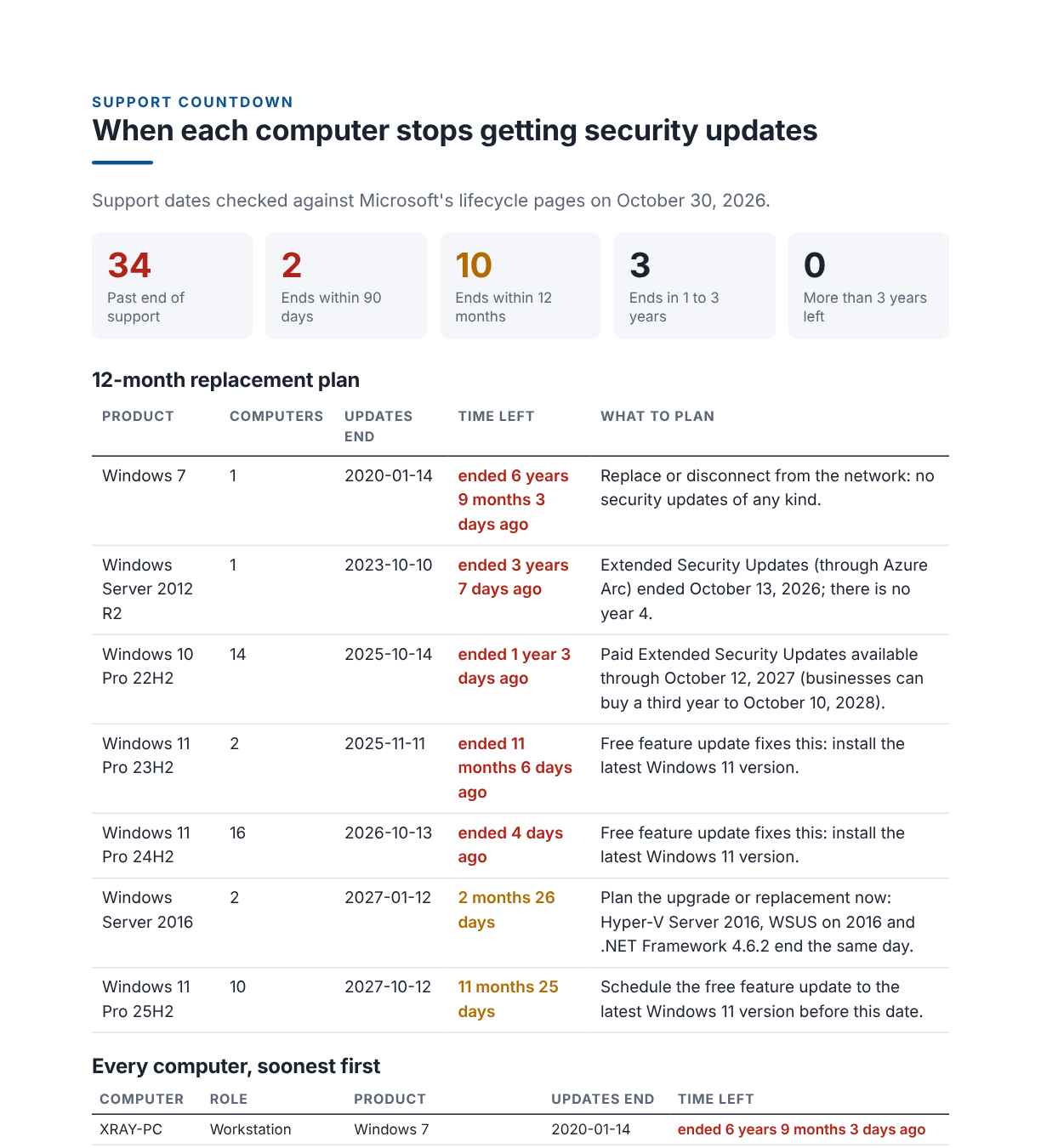
  • Every computer's support countdown, soonest first
  • Service accounts, certificates, print, RADIUS, trusts
Entra move readiness

What breaks on the first sync to the cloud

  • Sign-in names that Microsoft 365 can't use (.local domains, bad characters)
  • The same address on two accounts
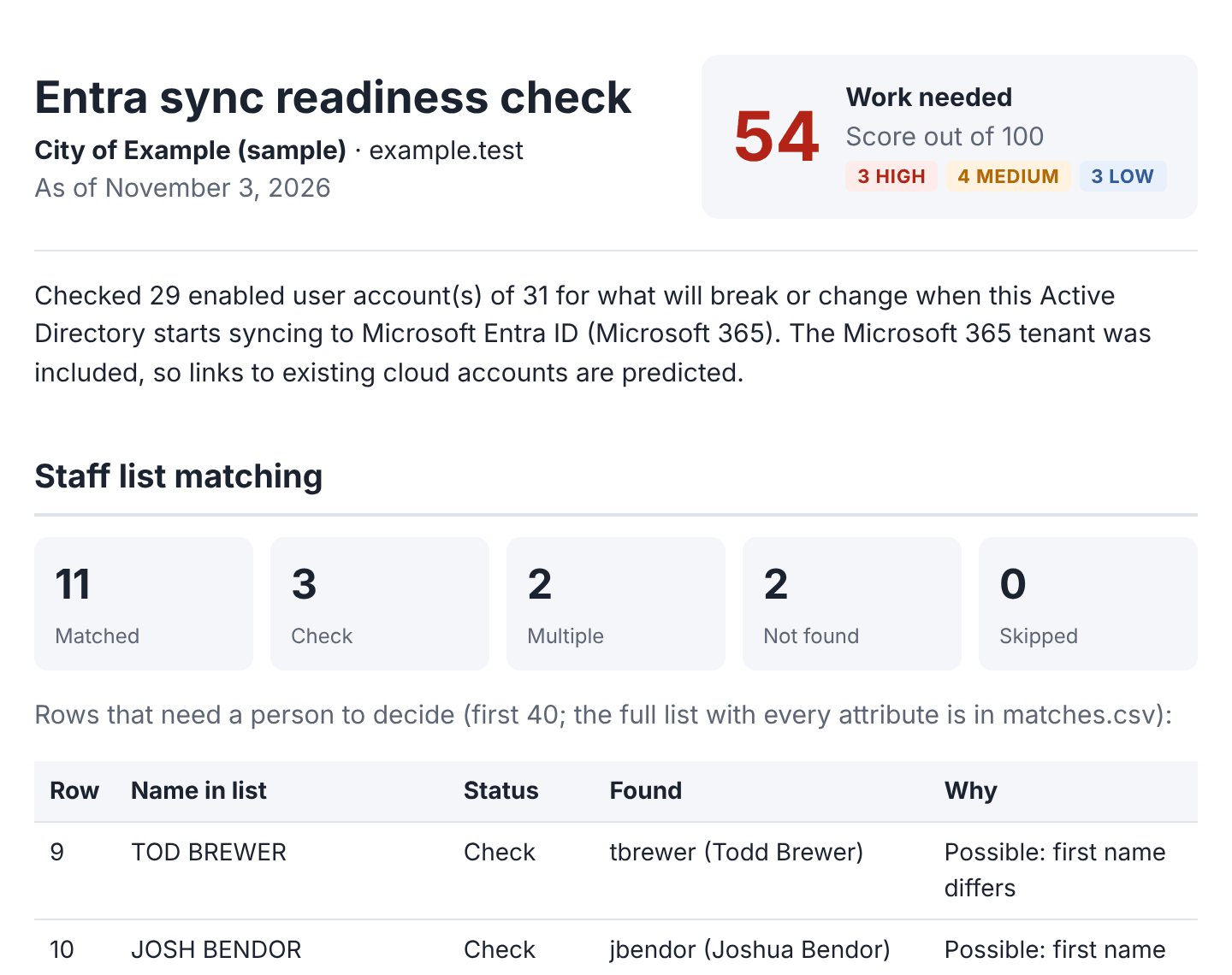
  • A staff list matched to AD accounts, with the doubtful ones flagged
  • Users who would get a second account, or take over someone else's
Microsoft 365 check

Every Microsoft 365 retirement date, per user

  • Users whose only MFA is a text message or call
  • Mailboxes, copiers and apps still using SMTP AUTH or EWS
  • Admins with no MFA, external forwarding, idle licences
  • Entra Connect Sync version and sign-in method
The report

Findings a client can read, with fixes a technician can run.

Every finding says why it matters, what to do, how long it takes, the commands to run, how to check it worked and how to undo it. Shown here with sample data.

Report page: support countdown showing how many computers are past end of support and a 12-month replacement plan
AD Exit Planner: every computer's support countdown and a 12-month replacement plan.
Entra sync readiness report showing staff list matching results and a high-priority cloud matching finding
Entra move readiness: staff list matching and cloud account conflicts.
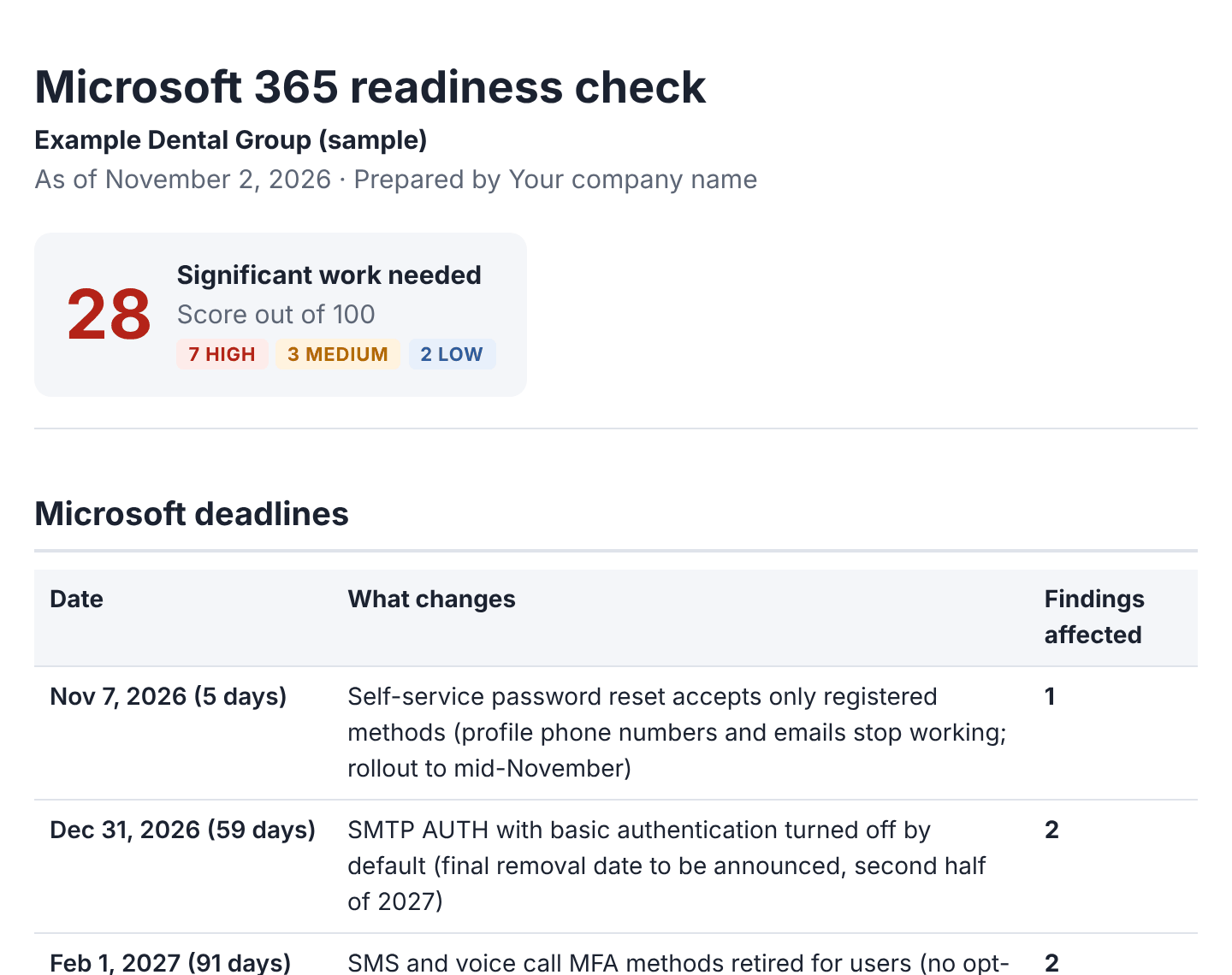
Microsoft 365 readiness report showing the deadline table and users whose only MFA method is SMS
Microsoft 365 check: each deadline with the users and mailboxes it affects.
How it works

About an hour from download to plan.

  1. Run it

    Double-click the launcher on a domain-joined computer, or the Microsoft 365 launcher on any Windows PC. It checks the computer first and says exactly what to fix. Nothing is changed.

  2. Read the score

    A score out of 100, findings ranked High to Low, and a list of anything that could not be checked, so a gap never looks like a pass.

  3. Work the plan

    Each fix comes with commands to review first, a check that it worked, a way to undo it, and a ready-to-edit email for the people it affects.

Who it's for

Built for the people who get the call when sign-in stops working.

Managed service providers

Run it at every client, hand over a branded report, and turn each Microsoft deadline into scheduled project work instead of emergency tickets.

For MSPs
Security and data

Built to pass your own security review.

Read-onlyEvery check reads. The one optional exception, LDAP bind logging, is a separate command you run on purpose and turn off afterwards.
Runs where your data already isOn a computer in your network, with your own admin account. Reports are files in a folder you choose.
Nothing is uploadedNo cloud service, no telemetry, no licence check that phones home.
Logs without personal dataRun logs record counts and steps, never names or addresses, so they can be sent to support safely.

How Attestry handles data

Questions

Common questions

What do I need to run it?

For Active Directory: a domain-joined Windows 10, 11 or Server 2016+ computer with the Active Directory PowerShell module (the launcher offers to install it). For Microsoft 365: any Windows PC and an admin account for the tenant. Windows PowerShell 5.1 and PowerShell 7 are both supported.

Does it change anything?

No. Every check only reads. Fixes are shown as commands for you to review and run yourself, each with a way to undo it.

Does any of our data leave our network?

No. Reports and data files are written to a folder you choose. Nothing is sent to Attestry or anyone else.

Our tenant doesn't have Entra ID P1. Will it work?

Yes. Microsoft withholds sign-in history and the MFA registration report without P1, so Attestry reads MFA methods user by user and the report lists exactly what it could not check.

What does it cost?

Early access is free during the beta. Pricing for MSPs, businesses and government will be published before general availability.

Will someone call me if I sign up?

No. We only email, and only about what you asked for. The form has no phone field.

See where you stand before the next deadline.

Early access is open for MSPs, businesses and government IT teams. Tell us what you run and we'll email you. We won't call.

Get early access